Case study
DHL IoT: User Onboarding & Profiles
Provisioning people on the DHL IoT platform, where who can use the platform and what they can do begins. More than an invite, this is where the role-based access model is applied: the flow guides an administrator through identity, role, responsibilities, and business-unit assignment, so new users land correctly scoped from day one. The user profile then keeps each person's identity and access legible in one place.
3
Parts: the user list, the onboarding flow, and the profileDay 1
New users land with the access they should have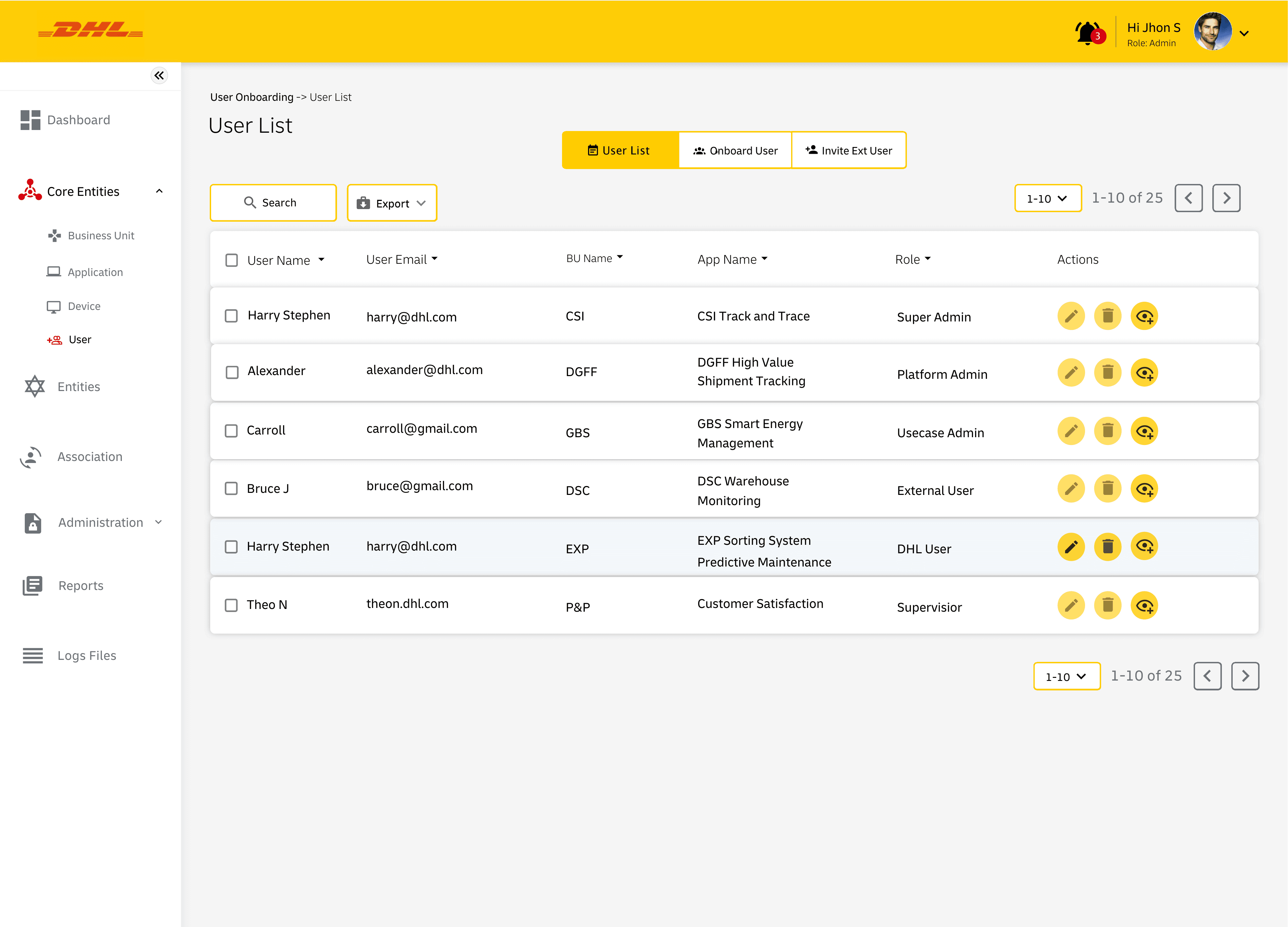
- Enterprise UX
- Interaction Design
- Onboarding
- Visual Design
Who can use the platform, and what they can do, starts at user onboarding. This module provisions people: inviting them, assigning roles and responsibilities, and tying them to the business units they belong to. The profile then shows who each person is on the platform.
- 1IA. Listing, onboarding, and inviting share one segmented control, so provisioning is never more than a tab away.
- 2Research. External users get their own invite path, kept separate from onboarding DHL staff.
- 3IA. Business unit is its own column, because every user is tied to a unit at onboarding.
- 4Components. Role reads inline on every row, from Super Admin to External User, so scope is legible before opening a record.
- 5Components. Edit, delete, and view stay on every row; the hovered row lifts its icons to full contrast.
- 6IA. User sits under Core Entities beside Business Unit, Application, and Device, mirroring the platform's model.
The challenge
Onboarding a user is more than an invite. It is the moment the access model is applied, and if governance is added afterwards, people end up with the wrong access.
- Each user needs an identity, a role, responsibilities, and a business unit
- Access has to be right at the moment of onboarding, not corrected later
- It must be clear at a glance what a user can do, and where
Outcome
- New users reach the platform correctly scoped from day one, with governance applied at the moment of onboarding rather than after
- A polished onboarding experience ready for engineering, consistent with the rest of the platform
- A clear, manageable profile that made each user's identity and access legible across the platform
Continue reading
3 sections · 9 screens are protected. Enter the password, or request access.