[ Case study ]
DHL IoT: Applications, Notifications & Admin Console
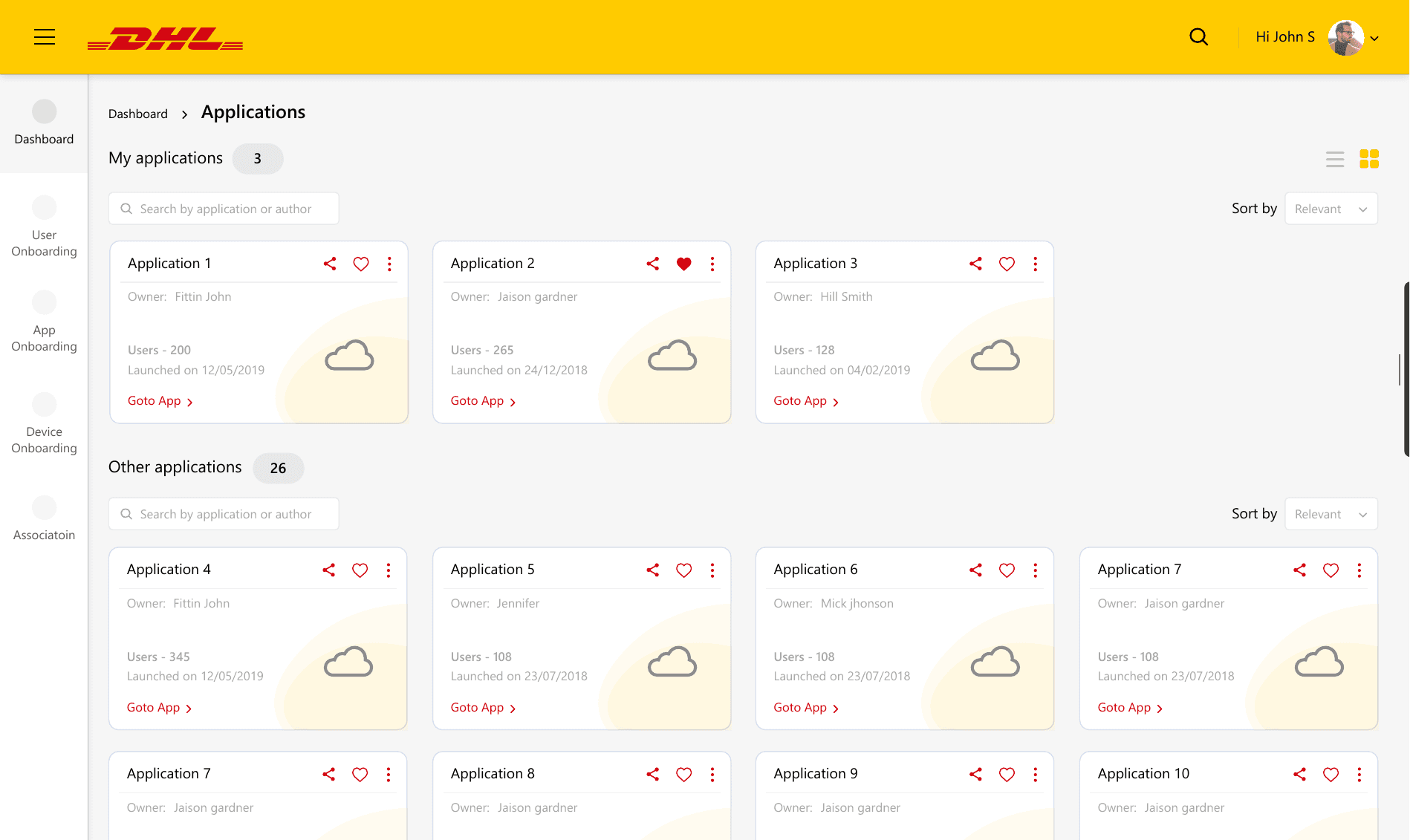
The everyday surfaces of the DHL IoT platform. The applications catalog is how people find and open the many IoT applications it hosts, with a clear split between the apps you own and the wider catalog. The notifications center gives one place to see what needs attention across a constant stream of events. And the admin console brings the platform's management surfaces together behind one navigation, so administration feels like one job rather than several tools.
- Client
- Deutsche Post DHL Group
- Role
- UX Architect · via Wipro
- Year
- 2019
- Disciplines
- Enterprise UX, Information Architecture, Interaction Design, Administration
[ Impact ]
3
Surfaces: applications catalog, notifications, admin console
2
Catalog views: grid and list
[ Information architecture ]
Catalog
- Available apps
App detail
- Configuration
- Devices
Associate
- Install
- Assign
Confidentiality notice
This covers active, NDA-bound product work, so the case study stays intentionally high-level: the focus is the design problem, the decisions I made, and the reusable outcomes rather than brand-specific implementation details.
The platform hosts many IoT applications, generates a constant stream of events, and has several management surfaces. These three modules are how people find their way: the applications catalog, the notifications center, and the admin console that ties the navigation together.
- 1IA. My applications lead with their own count, keeping owned apps above the 26 others in the catalog.
- 2Components. A grid or list toggle lets people choose density, browsing cards or scanning rows.
- 3Components. Each section sorts on its own, defaulting to Relevant.
- 4Tokens. Share and favorite sit in the card header; a filled red heart marks a favorite at a glance.
- 5Research. Cards carry owner, user count, and launch date, the essentials for choosing which app to open.
- 6Prototype. A Go To App link on every card keeps each application one click from open.
The challenge
- Many applications, and no single place to find and open them
- Connected operations generate a constant stream of events, and the urgent ones get buried
- Managing users, devices, applications, and business units felt like several tools
Outcome
- A catalog that scaled with the platform, making every connected application discoverable and one click from open
- A calm, scannable notifications experience that kept administrators ahead of issues instead of buried in noise
- A coherent administration experience that scaled as the platform's entities and applications grew
[ Protected layer ]
The full case study is available on request.
High-fidelity screens, information architecture and the detailed process for this enterprise project are shared under NDA. Enter the access password, or request access and I will share the full walkthrough.